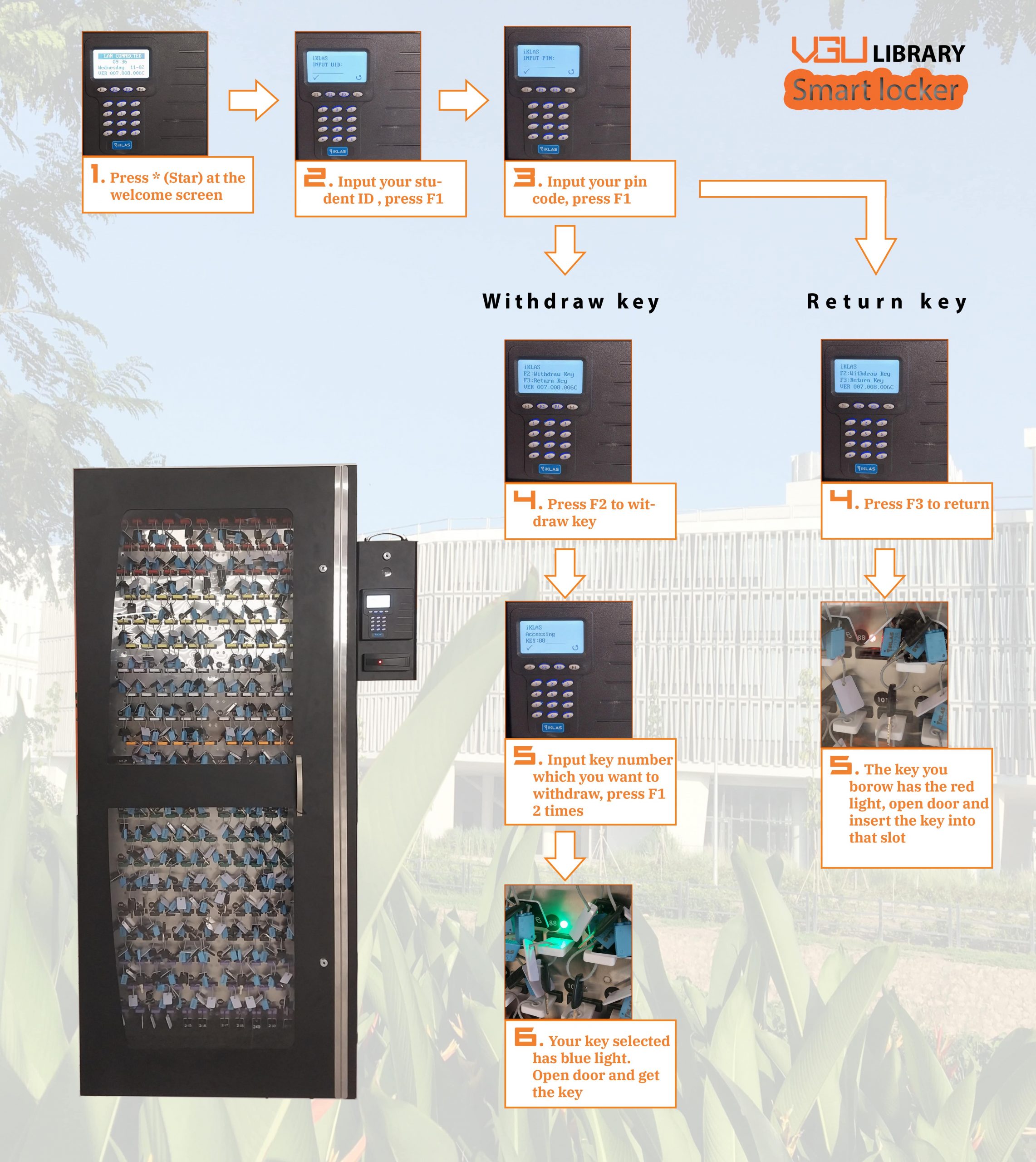

We provide the lockers to securely store personal belongings when you come to study at the Library. Please follow these guidelines to ensure a smooth experience.
1. Using the Lockers:
The locker station at the second floor of the Library building.
- Get a Locker key: Use your studentID and password that were send to your email by library to access the locker.
- At the keypad, press * to enter your studentID
- Press F1 to enter the pincode and then press F1 again. If your authentication failed, contact to the One Stop Service counter at the same floor.
- Press F2 then enter the key number you want to withdraw and press F1. You will hear a snapping sound and the light at the key you want to borrow turn green, you can open the door to take out the key and then close the door.
- Return key:
- To return a key, after you enter student ID, pincode and press F3 to return the key, you will hear a snapping sound then you can open the door and place and the key you borrowed at the red light slot.
2. Locker Rules and Policies
- Usage Duration: Each student is allowed to borrow only one key at a time and it must be returned before 9:30 PM on the same day. The system will remind you to return the key via student email. If you hold a key overnight, you will be charged overdue fee 500.000VND.
- Prohibited Items: Do not store hazardous materials or illegal substances.
- Assistance: Report any issues with lockers to library staff at the One Stop Services Counter immediately.
Thank you and we hope it enhances your library experience!